The Government of India is implementing the AgriStack Farmer Registry to provide every eligible farmer with a unique Farmer ID. This digital identity helps farmers access government schemes, subsidies, crop-related services, and other agricultural benefits through a single verified profile. The Farmer Registry is being rolled out state by state through official AgriStack portals.
At present, 12 official state Farmer Registry portals are operational:
- Assam
- Uttar Pradesh
- Madhya Pradesh
- Bihar
- Gujarat
- Maharashtra
- Rajasthan
- Tamil Nadu
- Haryana
- Andhra Pradesh
- Odisha
- Chhattisgarh
This guide explains the complete registration process, how to check enrollment status, download your Farmer ID, required documents, eligibility, and answers to frequently asked questions.
What is AgriStack Farmer ID?
The AgriStack Farmer ID is a unique digital identification number issued after successful enrollment in the Farmer Registry. It securely links a farmer’s verified identity with land records and other agricultural information maintained by the state government.
The objective is to simplify access to agricultural services while reducing duplicate records and improving scheme delivery.
States Where Official Farmer Registry Portal is Live
| State | Farmer Registry Status |
|---|---|
| Assam | Live |
| Uttar Pradesh | Live |
| Madhya Pradesh | Live |
| Bihar | Live |
| Gujarat | Live |
| Maharashtra | Live |
| Rajasthan | Live |
| Tamil Nadu | Live |
| Haryana | Live |
| Andhra Pradesh | Live |
| Odisha | Live |
| Chhattisgarh | Live |
The list is expected to expand as additional states join the AgriStack program.
Who Can Register?
A farmer can generally register if they:
- Are a resident of the participating state.
- Possess a valid Aadhaar number.
- Have an Aadhaar-linked mobile number for OTP verification.
- Own agricultural land or are eligible according to state Farmer Registry rules.
- Have land records available in the state’s digital database.
Eligibility requirements may differ slightly from one state to another.
Documents Required
Keep these documents ready before beginning registration.
- Aadhaar Card
- Mobile number linked with Aadhaar
- Land ownership records
- Revenue record details (Khata/Khasra/Survey Number as applicable)
- Bank account details (if required)
- Passport-size photograph (only where applicable)
Some states automatically fetch land records after Aadhaar verification.
How to Register for AgriStack Farmer ID
Currently, farmers cannot complete self-registration online through the AgriStack Farmer Registry portal. Registration is carried out only by authorized personnel, such as:
- Agriculture Department Officials
- Agriculture Sahayaks (or equivalent field staff, depending on the state)
- Common Service Centre (CSC) operators
The enrollment process generally follows these steps:
- Visit your nearest Agriculture Office, designated Agriculture Sahayak, or CSC Centre.
- Carry the required documents, including:
- Aadhaar Card
- Aadhaar-linked mobile number
- Land ownership records or relevant land details
- Any other documents required by your state
- The authorized operator will verify your identity using Aadhaar eKYC.
- Your personal and land details will be entered into the official AgriStack Farmer Registry portal.
- After successful submission, an application or acknowledgment reference number will be generated for future tracking.
If your are a CSC Operator, then Follow these Steps-
Although the portal interface varies slightly by state, the registration process is largely similar.
Step 1: Open Your State Farmer Registry Portal
Visit the official Farmer Registry portal for your state.
Here are the Farmer Registry Official Links
- Assam
- Uttar Pradesh
- Madhya Pradesh
- Bihar
- Gujarat
- Maharashtra
- Rajasthan
- Tamil Nadu
- Haryana
- Andhra Pradesh
- Odisha
- Chatisgarh
Step 2: Click on Login with CSC
After clicking on Login with CSC, enter your CSC operator ID and Password
Step 3: Start Registration with Aadhaar
After login Enter the Farmer Aadhaar ID
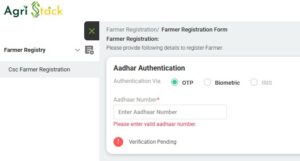
Step 4: Aadhaar Verification
Enter farmer Aadhaar number and complete OTP verification using your Aadhaar-linked mobile number.
Step 5: Fill Personal Details
Provide:
- Name
- Father’s Name
- Date of Birth
- Address
- District
- Village
- Mobile Number
Step 6: Enter and Verify Land Details
Fill in your agricultural land information as requested.
Step 7: Review & Submit
Verify all details carefully before submitting the application.
Step 8: Complete eKYC
Authenticate your Aadhaar through the required esign verification process and pay required amount from your CSC Wallet.
After successful submission, you’ll receive an Enrollment/Application Number for future reference.
How to Check Farmer Registry Enrollment Status
If you have already registered, you can track the progress of your application.
Steps
- Visit your state Farmer Registry portal.
- Assam
- Uttar Pradesh
- Madhya Pradesh
- Bihar
- Gujarat
- Maharashtra
- Rajasthan
- Tamil Nadu
- Haryana
- Andhra Pradesh
- Odisha
- Chatisgarh
- Click Check Enrollment Status.
- Enter the requested details (such as Application ID, Aadhaar, or registered mobile number, depending on the state).
- Complete OTP verification if prompted.
- View the current application status.
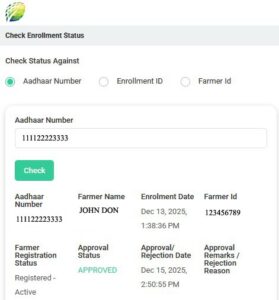
Common status messages include:
- Submitted
- Under Verification
- Pending Correction
- Approved
- Farmer ID Generated
Most official state portals provide a dedicated Check Enrollment Status option.
How to Download Farmer ID
Once your registration is approved, you can download your Farmer ID.
Steps
- Log in to your state’s Farmer Registry portal.
- Open your Farmer Dashboard or Profile.
- Select Download Farmer ID or Download Farmer Registry Card.
- Save the PDF.
- Print or store it digitally for future use.
If the download option is unavailable, your application may still be under verification.
Benefits of Farmer ID
A verified Farmer ID can help farmers:
- Access government agricultural schemes.
- Maintain a single verified digital identity.
- Receive faster benefit verification.
- Improve transparency in subsidy delivery.
- Access digital agricultural services through AgriStack.
- Reduce repeated document submissions across participating services.
Common Registration Problems
OTP Not Received
- Check whether your Aadhaar-linked mobile number is active.
- Retry after a few minutes.
Land Record Not Showing
Land records may not yet be synchronized with the Farmer Registry database.
Aadhaar Verification Failed
Ensure your Aadhaar details match the registration information exactly.
Enrollment Pending
Applications may remain under verification for several days depending on state processing timelines.
Download Option Missing
The Farmer ID becomes downloadable only after successful approval.
State-wise Farmer Registry Guides
For detailed instructions specific to each state, refer to the following guides:
- Assam Farmer Registry
- Uttar Pradesh Farmer Registry
- Madhya Pradesh Farmer Registry
- Bihar Farmer Registry
- Gujarat Farmer Registry
- Maharashtra Farmer Registry
- Rajasthan Farmer Registry
- Tamil Nadu Farmer Registry
- Haryana Farmer Registry
- Andhra Pradesh Farmer Registry
- Odisha Farmer Registry
- Chhattisgarh Farmer Registry
Frequently Asked Questions
Is Farmer ID mandatory?
Requirements vary by scheme and state, but many participating states are integrating Farmer ID into agricultural service delivery.
Is registration free?
Yes. Registration through the official Farmer Registry portal is free.
Can I register using my mobile phone?
Yes. Farmers can complete registration using a smartphone with internet access. Some states also support enrollment through authorized CSC centers.
Can tenant farmers register?
Eligibility depends on the respective state’s Farmer Registry policy.
Can I edit my details after registration?
Many state portals allow profile updates or correction requests after login, while others require assistance through authorized centers.
Conclusion
The AgriStack Farmer Registry is transforming how farmers access digital agricultural services by providing a verified Farmer ID linked to their identity and land records. Farmers in the 12 participating states can register online, monitor their enrollment status, and download their Farmer ID once approved. As the rollout expands, additional states are expected to join the platform, making the Farmer Registry a foundational part of India’s digital agriculture ecosystem.
Leave a Reply